How to Securely Wipe a Laptop Before Recycling in the UK
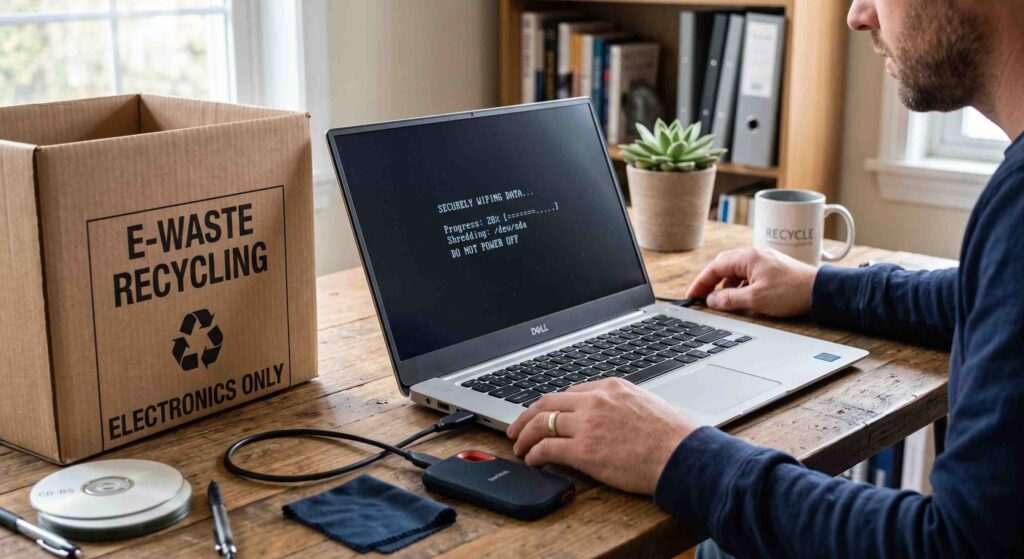
Whether you’re upgrading to a new device, clearing out old office equipment, or disposing of an unused computer, it’s important to understand how to securely wipe a laptop before recycling in the UK. Simply deleting files or moving documents to the recycle bin does not remove your personal information permanently. In many cases, deleted files can still be recovered using data recovery software.
Before sending a laptop for disposal, donation, resale, or recycling, you should take steps to protect your personal information, financial records, passwords, and sensitive business data. Proper laptop data destruction not only reduces the risk of identity theft but also helps ensure compliance with data protection responsibilities.
This guide explains the best way to erase laptop data before recycling, covers Windows, MacBook, and Chromebook devices, and outlines how to recycle old laptops safely in the UK.
Why You Must Erase a Laptop Before Recycling
Many people assume that deleting files is enough. Unfortunately, deleted data often remains stored on the device until it is overwritten.
What Personal Data Is Stored on a Laptop?
Modern laptops contain a significant amount of sensitive information, including:
- Saved passwords
- Banking and payment information
- Personal photographs
- Emails and messages
- Tax records
- Work documents
- Browser history
- Cloud storage credentials
- Social media logins
Even if you rarely use your laptop, it may still contain years of personal information.
What Happens If You Don’t Wipe Your Laptop?
Failing to erase a laptop before recycling can lead to several risks:
- Data recovery by unauthorised individuals
- Identity theft
- Financial fraud
- Exposure of confidential business information
- Privacy breaches
Secure laptop data removal helps prevent these issues and ensures your information cannot be easily accessed after disposal.
Back Up Important Files Before Wiping Your Laptop
Before performing a factory reset or secure erase, make sure you save any files you may need later.
Files You Should Save
Consider backing up:
- Documents
- Family photos
- Videos
- Music libraries
- Software licences
- Work files
- Browser bookmarks
Best Backup Methods
External Hard Drives
An external drive offers a simple way to store large amounts of data securely.
Cloud Storage
Services such as OneDrive, Google Drive, and iCloud allow you to access your files from anywhere.
USB Drives
For smaller amounts of data, a USB flash drive may be sufficient.
Taking a backup before you wipe a laptop before disposal ensures important files are not permanently lost.
Sign Out of All Accounts Before Recycling
Removing your accounts is an important step that many users overlook.
Remove Microsoft Account
Sign out of your Microsoft account and unlink the device from your account dashboard.
Sign Out of Google Services
Remove Google accounts from browsers and disable device synchronisation.
Remove Apple ID and iCloud
MacBook users should sign out of iCloud, Apple ID, Find My Mac, and iMessage before resetting the device.
Disconnect Password Managers
If you use password management software, ensure all accounts are removed from the laptop before disposal.
This process helps remove personal data from a laptop permanently and prevents future access issues.
How to Wipe a Windows Laptop Before Recycling
If you’re wondering how to wipe a Windows laptop before recycling, the process is straightforward.
How to Factory Reset a Windows 11 Laptop
- Open Settings
- Select System
- Click Recovery
- Choose Reset this PC
- Select Remove Everything
- Enable Clean Data
- Follow the on-screen instructions
How to Factory Reset a Windows 10 Laptop
- Open Settings
- Select Update & Security
- Choose Recovery
- Click Get Started
- Select Remove Everything
- Enable drive cleaning options
Enable the “Clean Data” Option
The “Clean Data” option overwrites information on the storage device, making recovery significantly more difficult.
This is one of the best ways to securely erase laptop data before recycling.
Need Professional Laptop Disposal?
If you’re recycling multiple devices or business laptops, professional data destruction services can provide additional peace of mind.
Computer Waste Recycling Ltd offers secure laptop recycling, IT asset disposal, and WEEE-compliant recycling services throughout the UK. Contact our team to discuss secure device disposal options.
How to Wipe a MacBook Before Recycling
MacBook users should take additional steps to ensure all personal information is removed.
Sign Out of Apple Services
Before erasing the device:
- Sign out of iCloud
- Disable Find My Mac
- Sign out of iMessage
- Remove Apple ID associations
Erase All Content and Settings
Recent versions of macOS include an “Erase All Content and Settings” feature.
To access it:
- Open System Settings
- Select General
- Click Transfer or Reset
- Choose Erase All Content and Settings
Reinstall macOS for the Next User
Reinstalling macOS leaves the laptop ready for its next owner while ensuring your data is removed.
How to Wipe a Chromebook Before Recycling
Chromebooks use a different reset process known as Powerwash.
Perform a Powerwash Reset
- Open Settings
- Navigate to Advanced Settings
- Select Reset Settings
- Choose Powerwash
- Confirm the reset
Remove Linked Google Accounts
Ensure all Google accounts are removed from the device before disposal.
A Chromebook Powerwash returns the device to factory settings and removes local user data.
Factory Reset vs Secure Data Wiping: What’s the Difference?
| Method | Security Level | Recommended for Recycling |
| Delete Files | Low | No |
| Format Drive | Medium | Sometimes |
| Factory Reset | High | Yes |
| Secure Erase Software | Very High | Best |
Can Deleted Files Be Recovered?
Yes. In many cases, deleted files remain on the storage device and may be recovered using specialist software.
Is a Factory Reset Enough Before Recycling a Laptop?
For most personal users, a factory reset combined with drive cleaning provides a strong level of protection.
However, organisations handling sensitive information may require additional laptop data destruction measures.
How to Wipe an SSD or Hard Drive Before Recycling
SSD Secure Erase Explained
Solid-state drives store information differently from traditional hard drives.
An SSD erase process uses built-in commands to permanently remove data from storage cells.
HDD Data Wiping Methods
Traditional hard drives can be wiped using secure overwrite methods that replace existing information with new data patterns.
When Physical Drive Destruction May Be Necessary
Businesses handling confidential data may choose physical destruction of storage devices as part of a secure data destruction UK strategy.
This is often used for highly sensitive or regulated information.
How to Check That Your Laptop Has Been Properly Wiped
Verify the First-Time Setup Screen
After resetting the laptop, restart it.
The device should display the original setup screen.
Confirm No User Accounts Remain
Ensure all personal profiles have been removed.
Ensure Storage Is Empty
Verify that personal files, folders, and installed applications no longer appear on the device.
These checks help confirm successful secure laptop data removal.
Laptop Recycling UK: Where Can You Recycle an Old Laptop?
What Are WEEE Regulations?
The Waste Electrical and Electronic Equipment (WEEE) Regulations govern how electronic waste is collected, treated, and recycled in the UK.
These regulations aim to reduce environmental harm and encourage responsible computer recycling.
Local Authority Recycling Centres
Many councils provide dedicated electronic waste collection facilities.
Retailer Take-Back Programmes
Some electronics retailers accept old devices for recycling when purchasing replacements.
Certified Electronics Recycling Services
Specialist recycling providers can safely process devices and ensure compliance with WEEE regulations.
Laptop Donation vs Recycling: Which Is Better?
When to Donate a Laptop
Donation may be appropriate if:
- The laptop remains functional
- Hardware is reasonably modern
- Security measures have been completed
When Recycling Is the Better Option
Laptop recycling is usually preferable when:
- The device no longer works
- Repairs are uneconomical
- Components have reached end-of-life
Data Security Considerations
Whether donating or recycling, always wipe the laptop before disposal and remove all personal information.
Common Mistakes to Avoid Before Recycling a Laptop
Forgetting to Back Up Files
Always create backups before performing a factory reset.
Not Signing Out of Accounts
Leaving accounts connected can create future security concerns.
Assuming Deleted Files Are Gone Forever
Deleted files often remain recoverable.
Leaving SD Cards or USB Devices Connected
Remove all external storage devices before recycling.
Skipping Secure Erase Options
Where available, use secure erase settings to improve data protection.
Laptop Recycling Checklist
Before recycling your laptop:
✔ Back up important files
✔ Export passwords
✔ Remove Microsoft, Apple, and Google accounts
✔ Disconnect cloud services
✔ Remove USB drives and SD cards
✔ Factory reset the device
✔ Securely erase data where possible
✔ Verify the wipe was successful
✔ Recycle through approved UK facilities
Frequently Asked Questions
How do I completely wipe a laptop before recycling?
Use the device’s factory reset function and enable secure drive cleaning options where available.
Is a factory reset enough before recycling a laptop?
For most users, yes. Additional secure erase methods may be appropriate for sensitive information.
Can someone recover data after a factory reset?
Recovery is generally more difficult after a proper factory reset, especially when drive cleaning features are enabled.
Should I remove the hard drive before recycling?
Some organisations choose this option for additional security, particularly when handling confidential information.
How do I securely erase an SSD?
Most SSD manufacturers provide secure erase utilities designed specifically for solid-state drives.
Where can I recycle an old laptop in the UK?
You can use local authority recycling centres, retailer take-back schemes, or specialist WEEE-compliant recycling providers.
What is the safest way to dispose of a laptop?
The safest approach combines secure data removal with recycling through an approved electronics recycling provider.
How long does it take to wipe a laptop before recycling?
The process can take anywhere from 30 minutes to several hours depending on the device and wiping method used.
Conclusion
Knowing how to securely wipe a laptop before recycling in the UK is essential for protecting your personal information and reducing the risk of unauthorised access. Whether you use a Windows laptop, MacBook, or Chromebook, taking the time to back up files, sign out of accounts, perform a factory reset, and securely erase stored data can make a significant difference.
Once your data has been removed, recycling your laptop through a reputable provider helps support responsible electronic waste management and compliance with WEEE regulations. By following the steps outlined in this guide, you can recycle your device with confidence while protecting your digital privacy.
Secure Laptop Recycling & Data Destruction Services
Looking for a trusted UK provider for laptop recycling and secure data destruction?
Computer Waste Recycling offers secure IT recycling, laptop disposal, WEEE-compliant recycling, and data destruction services for businesses across the UK. Contact our team to arrange collection or discuss your recycling requirements.
Computer Waste Recycling
Head Office
46 Jellicoe Road
Leicester
LE5 4FN
Phone: 0330 341 0785
Email: info@computerwaste.co.uk