ICT Equipment Disposal for Schools Secure IT Recycling
Schools rely on technology every day. Laptops support lessons, desktop computers manage administration, tablets help students learn, servers keep systems running, and networking equipment connects the entire organisation.
But technology does not last forever.
When computers become slow, laptops reach the end of their useful life, servers are replaced or devices are damaged beyond economical repair, schools need a clear plan for what happens next. Simply placing unwanted equipment in storage or sending it to general waste can create unnecessary environmental, security and compliance concerns.
ICT equipment disposal for schools should therefore be treated as a planned process covering secure collection, data destruction, reuse where appropriate and responsible recycling.
For UK schools, the process can also involve WEEE Regulations, data protection requirements and proper documentation. Government guidance explains that the WEEE framework is designed to encourage recovery, reuse and recycling of electrical and electronic equipment.
Computer Waste Recycling provides nationwide IT recycling and IT asset disposal services, including computers, laptops, servers, networking equipment, mobile devices, printers and other IT hardware.
Request a School IT Collection
What Is ICT Equipment Disposal for Schools?
ICT equipment disposal is the process of managing technology that a school no longer needs or cannot continue using.
The process can involve identifying redundant assets, removing or destroying stored data, collecting equipment securely, assessing whether items can be reused or refurbished, and sending unsuitable equipment into appropriate recycling routes.
School ICT disposal can cover a wide range of equipment, including:
- Desktop computers
- Laptops
- Chromebooks
- Tablets
- Monitors
- Servers
- Routers
- Network switches
- Printers
- Scanners
- Interactive whiteboards
- Mobile phones
- Storage devices
- Other electronic equipment
The important point is that disposal does not necessarily mean destruction.
A working laptop may have useful life remaining. A server may contain recoverable components. A monitor may be suitable for recycling. A damaged hard drive may require physical destruction because it contains sensitive information.
IT Disposal, IT Recycling and IT Asset Disposal: What Is the Difference?
These terms are related but describe different parts of the process.
IT disposal generally refers to removing unwanted technology from an organisation.
IT recycling focuses on recovering materials and processing equipment responsibly.
IT asset disposal (ITAD) is broader. It can include asset identification, collection, data destruction, refurbishment, recycling, reporting and documentation.
For a school with a large technology estate, IT asset disposal for schools can provide a more structured approach than simply arranging a waste collection.
Why Proper School IT Disposal Matters
Schools hold information relating to pupils, parents, teachers, employees and suppliers. Old devices can therefore contain information that should not be accessible to unauthorised people.
The Information Commissioner’s Office (ICO) advises that personal information can remain on computers, laptops, tablets, printers, external drives and other devices with permanent memory. It also explains that simply formatting a storage device is not necessarily sufficient for secure deletion.
That makes secure disposal an important part of responsible school IT disposal.
Protecting Student and Staff Data
School devices can contain many different types of information, including documents, emails, photographs, user accounts, administrative records and cached credentials.
Before equipment leaves school premises, the organisation should establish what information is stored on it and determine the appropriate method of secure deletion or destruction.
The ICO recommends keeping appropriate processes for secure disposal and maintaining evidence such as destruction logs and certificates where relevant.
Maintaining Data Protection Responsibilities
It is important not to assume that recycling a device automatically removes the data stored on it.
The ICO states that organisations should securely destroy personal data when it is no longer needed, and appropriate security measures should protect personal information.
For this reason, schools looking for GDPR compliant IT disposal should consider data security as a separate stage of the disposal process rather than treating it as an afterthought.
Reducing Electronic Waste
Responsible school technology recycling can also help keep unwanted electrical equipment out of inappropriate waste streams.
The UK WEEE framework promotes recovery, reuse and recycling of electrical and electronic equipment.
Instead of immediately destroying everything, schools can consider whether suitable equipment can be reused or refurbished.
Understanding WEEE Compliance for Schools
WEEE stands for Waste Electrical and Electronic Equipment.
The UK WEEE Regulations provide a framework for managing electrical and electronic equipment at the end of its life. Government guidance explains that the regulations aim to reduce WEEE being incinerated or sent to landfill and encourage recovery, reuse and recycling.
What Is WEEE Compliance?
WEEE compliance involves managing relevant electrical and electronic equipment in accordance with applicable environmental requirements.
Not every organisation has exactly the same responsibilities under the regulations. Producer, distributor and waste-management responsibilities can differ, so schools should not assume that every WEEE obligation applies to them in the same way.
For disposal projects, the practical priority is to ensure unwanted equipment enters an appropriate and properly managed waste or recycling route.
Which School Equipment Can Be WEEE?
ICT equipment commonly falls within the wider category of electrical and electronic equipment.
Government guidance identifies IT and telecommunications equipment as one of the categories covered by the WEEE framework.
This can include many of the devices found in schools, such as:
- Computers
- Laptops
- Tablets
- Servers
- Networking hardware
- Monitors
- Printers
- Other electrical and electronic technology
WEEE-Compliant ICT Equipment Disposal for Schools
A responsible WEEE compliant ICT equipment disposal for schools process should consider:
- What equipment is being removed.
- Whether the equipment contains data.
- Whether it can be reused or refurbished.
- How it will be transported.
- Which treatment or recycling route is appropriate.
- What records should be retained.
Schools should also verify the credentials and waste-handling arrangements of any provider they appoint.
Learn About Computer Waste Recycling Services
Common ICT Equipment Schools Need to Dispose Of
Schools can accumulate substantial amounts of redundant technology over time.
School Laptop Recycling
Laptops are among the most common items involved in school laptop recycling.
They can contain sensitive information and rechargeable batteries, so they should be handled carefully.
A professional recycling process can assess laptops for reuse, secure data wiping or destruction, and appropriate recycling.
Computer Recycling for Schools
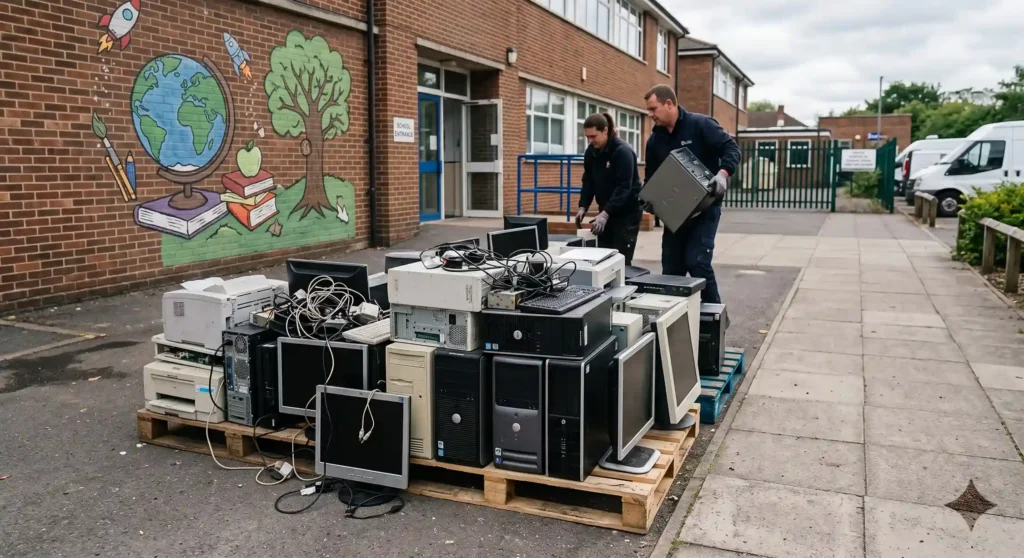
Old desktop computers can take up considerable storage space when schools replace large numbers of machines.
Computer recycling for schools can provide a route for redundant desktops while allowing usable equipment and components to be recovered where appropriate.
Chromebook and Tablet Recycling
Chromebooks and tablets are increasingly common in education environments.
Before school device recycling, schools should consider user accounts, locally stored files, removable storage and any management or enrolment settings associated with the devices.
Servers and Network Equipment
Servers, switches, routers and other network equipment can contain storage media or configuration information.
Education sector IT disposal should therefore include an assessment of data-bearing equipment rather than treating every device as ordinary electronic waste.
Printers, Monitors and Interactive Whiteboards
Printers can contain internal storage, while monitors and interactive whiteboards contain electrical and electronic components.
These items should be included in the school’s wider school equipment recycling and disposal plan.
Risks of Improper ICT Equipment Disposal
Improper disposal can create several avoidable problems.
Data Recovery Risks
Deleting files or performing a basic format does not necessarily provide the same level of security as a properly managed data destruction process.
The ICO explains that formatting alone is not sufficient to securely delete data because information may remain recoverable.
Data Protection Risks
Where personal information is involved, schools need to consider their wider data protection responsibilities.
The ICO recommends secure disposal processes and maintaining appropriate records for hardware containing personal information.
Environmental Risks
Sending electronic equipment through unsuitable waste channels can undermine opportunities for material recovery and reuse.
Proper school e-waste recycling helps ensure redundant equipment is managed through an appropriate route.
Reputational Risks
Schools have responsibilities to their pupils, staff and wider communities.
A documented disposal process provides greater confidence than simply giving old equipment to an unknown recipient or leaving unwanted devices in unsecured storage.
Secure Data Destruction for School IT Equipment
Data destruction should be one of the first considerations when preparing devices for disposal.
Data Wiping vs Hard Drive Destruction
There are two broad approaches.
Secure data wiping can be appropriate when a device or storage medium is going to be reused. The objective is to remove information securely while preserving the hardware.
Physical destruction, such as hard drive shredding, is appropriate when the storage medium will not be reused and the organisation requires the data-bearing component to be destroyed.
The ICO recognises both secure deletion and physical destruction as possible approaches, depending on the circumstances and the importance of ensuring information cannot be recovered.
Certified Data Destruction
Schools may want documentary evidence showing that data-bearing equipment has been processed.
A professional secure data destruction schools service can provide relevant records or certificates where offered by the provider.
Computer Waste Recycling states that its process includes certified data destruction, with sensitive data securely wiped or physically destroyed, followed by reporting and certification.
Maintaining a Chain of Custody
Data security should not stop when a device is carried out of a classroom or IT room.
A well-managed disposal process considers:
- Who collects the equipment
- Where equipment is stored
- How it is transported
- When data is destroyed
- How assets are recorded
- What documentation is produced
This is particularly useful for schools handling larger collections.
Explore Secure Data Destruction Services
What Is IT Asset Disposal (ITAD) for Schools?
IT Asset Disposal (ITAD) is a structured approach to managing technology at the end of its useful life.
Rather than treating disposal as a single collection event, ITAD can bring together inventory management, secure transportation, data destruction, asset assessment, reuse, recycling and reporting.
For schools and Multi-Academy Trusts, this approach can be particularly useful when multiple sites are replacing equipment at the same time.
Asset Inventory
Start with an asset register.
Record relevant information such as:
- Equipment type
- Manufacturer
- Model
- Asset number
- Serial number
- Location
- Condition
- Data-bearing status
- Disposal decision
This gives the school a clear record before equipment leaves its control.
Asset Recovery and Reuse
Some technology may retain value.
A professional IT asset disposal provider UK service may assess equipment for potential reuse, refurbishment or recovery before recycling.
Computer Waste Recycling states that collected equipment is assessed for reuse, refurbishment, recycling or secure data destruction.
Reporting and Certification
Documentation can provide evidence that equipment was processed according to the agreed disposal procedure.
This can include inventory reports, destruction records and relevant certificates.
School Technology Recycling and Sustainability
Responsible disposal is not only about getting rid of old equipment.
Schools can also use technology recycling as part of a broader sustainability strategy.
Prioritise Reuse Where Appropriate
If a laptop still works and can meet another user’s requirements, reuse may be preferable to immediate recycling.
Refurbishment can extend the useful life of equipment and reduce the demand for replacement hardware.
Support the Circular Economy
A circular approach aims to keep products and materials in use for longer.
For schools, that can mean:
- Repairing equipment where practical.
- Reusing suitable devices.
- Refurbishing equipment.
- Recovering components.
- Recycling equipment that cannot reasonably be reused.
School Electronics Recycling
When equipment reaches the genuine end of its useful life, school electronics recycling provides a route for recovering materials and managing electronic waste appropriately.
This is preferable to allowing obsolete equipment to accumulate indefinitely in cupboards, storerooms and classrooms.
How to Choose an ICT Disposal Company
Choosing a provider is an important part of ICT recycling services for schools.
The cheapest collection is not necessarily the best option if it does not provide adequate data security, documentation or responsible recycling.
Check the Provider’s Credentials
Ask the provider about its relevant environmental, information-security and waste-management credentials.
Computer Waste Recycling’s website currently identifies its services as certified and accredited and displays references to Cyber Essentials, ISO 27001, the ICO and the Environment Agency. Schools should still confirm the specific certification scope and current status when evaluating a provider.
Ask About Data Destruction
Find out:
- How is data removed?
- Is wiping available?
- Is physical destruction available?
- How are SSDs handled?
- What happens to failed drives?
- Is destruction documented?
- Are certificates provided?
Check Collection and Transportation
A school IT equipment collection should be planned around the school’s timetable, site access and security requirements.
Ask how equipment is collected, transported and tracked.
Ask About Recycling and Reuse
A responsible provider should be able to explain what happens after collection.
Ask whether working equipment is assessed for reuse and how non-reusable equipment enters the appropriate recycling process.
Consider Documentation
For schools, documentation can be important for internal records and audits.
Ask what paperwork will be supplied after the job, such as inventory reports, recycling documentation or certificates of data destruction.
ICT Equipment Disposal Checklist for Schools
Use this checklist when planning your next disposal project.
1. Create an Asset Inventory
List the equipment due for disposal.
2. Identify Data-Bearing Equipment
Determine which computers, laptops, servers, tablets, phones, printers and storage devices may contain personal or confidential information.
3. Check Retention Requirements
Do not delete information simply because a device is being replaced. Confirm that required records have been retained before destruction.
4. Back Up Required Information
Ensure necessary information has been transferred to approved systems before devices are wiped or destroyed.
5. Select Reuse or Recycling
Decide whether each item should be reused, refurbished, recovered or recycled.
6. Arrange Secure Collection
Use a suitable secure IT disposal for schools provider and agree collection arrangements.
7. Complete Data Destruction
Ensure data-bearing equipment is securely wiped or physically destroyed according to the agreed process.
8. Obtain Documentation
Keep appropriate disposal, destruction and recycling records.
9. Update the Asset Register
Remove disposed assets from the school’s inventory and retain relevant evidence.
Best Practices for Sustainable ICT Disposal
A good disposal project should not be a one-off reaction to a cupboard full of old computers.
Schools can establish a repeatable process.
Create a School IT Disposal Policy
Set out who approves disposal, how assets are recorded, how data is handled and which providers may be used.
Review Equipment Regularly
Regular asset reviews help identify equipment approaching the end of its useful life.
Keep Data Security Central
Data destruction should be considered before equipment leaves the school.
Prioritise Reuse
Where appropriate, reuse or refurbishment can extend equipment life.
Work With Suitable Providers
A professional ICT disposal company can help schools manage larger collections and combine collection, data destruction, recycling and reporting.
Plan for Multi-Academy Trusts
For MATs, a central disposal framework can help standardise processes across different schools.
Instead of every school arranging separate collections, the trust can establish consistent procedures for asset registers, data destruction, collection and documentation.
Frequently Asked Questions
What is ICT equipment disposal?
ICT equipment disposal is the controlled process of removing unwanted or obsolete technology from a school. It can include asset inventory, secure data destruction, collection, reuse, refurbishment and responsible recycling.
How do schools dispose of old computers?
Schools should first identify whether the computers contain data and whether the equipment can be reused. Required information should be retained, sensitive data should be securely removed, and equipment that is no longer suitable for use should be sent through an appropriate recycling or disposal route.
What is WEEE compliance for schools?
WEEE refers to Waste Electrical and Electronic Equipment. The UK WEEE framework provides rules for managing relevant electrical and electronic equipment and promotes recovery, reuse and recycling. Specific legal responsibilities can vary depending on the organisation and its role in the supply chain.
Is school IT equipment covered by GDPR?
GDPR and UK data protection requirements concern personal data rather than the physical equipment itself. However, school IT equipment can contain personal data, so schools need appropriate measures for protecting and securely disposing of information stored on devices. The ICO specifically advises organisations to securely dispose of hardware containing personal information and retain appropriate evidence of disposal.
How can schools recycle ICT equipment?
Schools can identify equipment for disposal, separate data-bearing devices, determine whether items can be reused or refurbished, arrange an appropriate collection and ensure equipment that cannot be reused enters a suitable recycling route.
What happens to old school laptops?
Old laptops can potentially be reused, refurbished, recovered for parts or recycled. Before a laptop is transferred to another party or recycling provider, schools should ensure data has been securely removed. The ICO notes that personal data can remain accessible on device storage even when a device is faulty or no longer operating normally.
How do schools securely destroy data?
Depending on the equipment and intended outcome, secure data removal may involve appropriate data-wiping processes or physical destruction of storage media. If equipment is being reused, secure wiping may be appropriate. If storage media will not be reused, physical destruction may be considered.
Can schools donate old ICT equipment?
Potentially, if the equipment is suitable for reuse and the school has followed its internal policies and completed appropriate data removal. Schools should also consider whether the recipient is suitable and whether transferring the equipment is preferable to recycling it.
What is IT Asset Disposal (ITAD)?
IT Asset Disposal is a structured approach to managing technology at the end of its useful life. It can include asset tracking, collection, secure data destruction, reuse, refurbishment, recycling and final reporting.
How should schools choose an IT disposal provider?
Schools should compare data-security processes, relevant credentials, collection arrangements, environmental practices, documentation and the provider’s ability to handle the types and volumes of equipment involved.
Conclusion
ICT equipment disposal for schools should be more than simply removing old computers from a classroom or storage room.
A well-planned process protects data, supports responsible electronic waste management and gives schools better visibility over what happens to their technology after it leaves the premises.
The key steps are straightforward:
- Maintain an accurate asset register.
- Identify devices containing sensitive information.
- Securely wipe or destroy data where appropriate.
- Consider reuse and refurbishment before recycling.
- Use suitable WEEE and recycling routes.
- Choose a provider that can manage secure collection.
- Keep appropriate disposal and destruction documentation.
For schools replacing laptops, computers, servers, tablets or networking equipment, professional school IT disposal can make the process easier to manage.
Computer Waste Recycling offers nationwide IT recycling, secure data destruction, equipment collection, asset assessment and reporting services. Its current service information covers computers, laptops, servers, networking equipment, mobile devices, printers and other IT equipment.
Request an ICT Equipment Collection
Computer Waste Recycling
46 Jellicoe Rd, Leicester LE5 4FN, United Kingdom
0330 341 0785
info@computerwaste.co.uk